What is Ram and How do i install it?
-
Hi i bought Flight simulator x and have not been able to play it as the frames are awfully slow.. like the textures like yawns to load when im flying.. a lil laggy too..
My friend said must upgrade ram.. i wiki it and still couldnt understand what is its use..
its something like memory? But isnt that the HDD?
My graphic card is a Asus N6600.. i think its enough for FSX..
How do i install it? Do i just slot it on like my graphic card into the motherboard into the similar empty components? -
Just insert the ram module into the slot loh...
-
open up your computer casing and find the ram.Originally posted by aloof_guy:Hi i bought Flight simulator x and have not been able to play it as the frames are awfully slow.. like the textures like yawns to load when im flying.. a lil laggy too..
My friend said must upgrade ram.. i wiki it and still couldnt understand what is its use..
its something like memory? But isnt that the HDD?
My graphic card is a Asus N6600.. i think its enough for FSX..
How do i install it? Do i just slot it on like my graphic card into the motherboard into the similar empty components?
take it out and check the frequency and speed of the ram.
buy a RAM with the same frequency and speed but higher capacity.
slot it back in. -
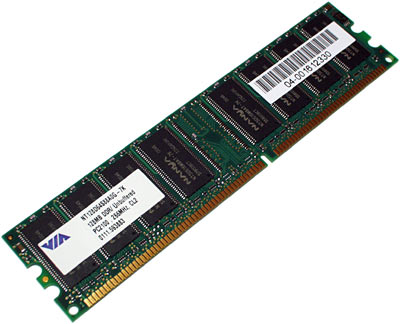
This is called RAM:

This is a RAM slot:
You are to buy a piece of RAM and slot them into the slots. -
sorry cant seem to view the pictures.. theres an X..Originally posted by ndmmxiaomayi:This is called RAM:
This is a RAM slot:
You are to buy a piece of RAM and slot them into the slots.
anyway for the ram slot, is there a specific slot for my ram? Its on my motherboard right.. yea stupid question but im kinda noob. am i able to add ram on top of my current ram? -

ok
-
its called Ram because you are supposed to ram it into your computer.
-
See our expert has guided you...
-
there is a specific slot for the RAM. the other slots won't fit. normally motherboards have limited slots for the RAM. mostly is 2-3 slots, so u have to check whether u still got slots anot.Originally posted by aloof_guy:sorry cant seem to view the pictures.. theres an X..
anyway for the ram slot, is there a specific slot for my ram? Its on my motherboard right.. yea stupid question but im kinda noob. am i able to add ram on top of my current ram?
and yes u can buy new RAM and add onto your motherboard combine with your older RAM. -
http://www.dansdata.com/images/ecsvsasus/asusram400.jpgOriginally posted by aloof_guy:sorry cant seem to view the pictures.. theres an X..
anyway for the ram slot, is there a specific slot for my ram? Its on my motherboard right.. yea stupid question but im kinda noob. am i able to add ram on top of my current ram? RAM
RAM
http://www.techwatch.com.au/reviews/hardware/ecs_k7s5a/ram.jpg RAM slots
You can't add the new RAM on top of old RAM. But is able to add new RAM to top up the current available amount.
To insert, the gold parts have to be facing the motherboard.
Note that the RAM slots have specific size and have "delimiters". See picture below.
Red circle parts are what I called "delimiters".
The RAM will also have these "delimiters". They have to match according, like jigsaw puzzle. -
.ram are also video files

-
ah thanks guys. is there a way to check my ram which i can support without taking out the current ram inside? i dont haf my motherboard manual..

-
go download cpu-z and run it. it will display how many ram u have and what kind of ram u are using