PC does not boot up after installing of RAM & Hard Disk.
-
I'm really frustrated now.

Last Sunday I went to SLS to get my HP Pavilition T548d fixed. There was some problem with the power supply (?) and I went to get it fixed(the uncle changed the "box thingy" at the top part of the CPU and it's called iCute. The one that has a three pin thingy coming out on the outside) and got an upgrade of ram and hard disk space. It was okay for a few days and it died on me suddenly.
I can on my CPU and there's power going into the CPU but it doesn't show anything on my monitor. There's no signal on my monitor. And when I tried to dock my ipod to my CPU, it does not show that its charging. I suppose there's no power going out of the CPU.
I don't know what the problem is but I called some techies up and they told me it was a ram problem from my description of the problem and they told me to take the RAM out and clean the gold coloured part with a tissue. I did that and my computer is still dead.
Can somebody help me? I don't think I want to go back to that shop again because some disagreements with that shop uncle.
And does anybody know of any cheap and reliable on-site repair services?
Edit: Oh yeah and I read on some websites that the RAM has to be a pair? Before changing my RAM that shopkeeper told me that mine wasn't in a pair so he asked me if I wanted to change and upgrade it. But it worked well when it wasn't a pair leh.
-
might be ram problem... take out your new ram and put back the old ram. then test and see whether it works.
if your old ram works, then probably its the ram's problem. In this case, you can bring it back to the shop and get an exchange, cos rams have life time warranty.
If its not ram problem, then ask someone else cos i dunno liao. -
i'll try this now. i want to ask something also.
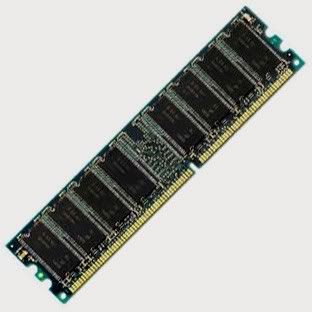
RAM upside down or whichever direction also can huh. as long as the gold part is touching the part on the cpu huh?
 Originally posted by abao:
might be ram problem... take out your new ram and put back the old ram. then test and see whether it works.
if your old ram works, then probably its the ram's problem. In this case, you can bring it back to the shop and get an exchange, cos rams have life time warranty.
If its not ram problem, then ask someone else cos i dunno liao. -
Originally posted by dahliamorie:
I'm really frustrated now.
Last Sunday I went to SLS to get my HP Pavilition T548d fixed. There was some problem with the power supply (?) and I went to get it fixed(the uncle changed the "box thingy" at the top part of the CPU and it's called iCute. The one that has a three pin thingy coming out on the outside) and got an upgrade of ram and hard disk space. It was okay for a few days and it died on me suddenly.
I can on my CPU and there's power going into the CPU but it doesn't show anything on my monitor. There's no signal on my monitor. And when I tried to dock my ipod to my CPU, it does not show that its charging. I suppose there's no power going out of the CPU.
I don't know what the problem is but I called some techies up and they told me it was a ram problem from my description of the problem and they told me to take the RAM out and clean the gold coloured part with a tissue. I did that and my computer is still dead.
Can somebody help me? I don't think I want to go back to that shop again because some disagreements with that shop uncle.
And does anybody know of any cheap and reliable on-site repair services?
Edit: Oh yeah and I read on some websites that the RAM has to be a pair? Before changing my RAM that shopkeeper told me that mine wasn't in a pair so he asked me if I wanted to change and upgrade it. But it worked well when it wasn't a pair leh.
ur CPU fan spinning? if it is...then at least U are getting 5V out of ur mobo.

U still got ur old RAM or not?like mentioned by abao...plug in old RAM and see if it works.if it doesnt....just switch on without any RAM and see if U can get any error msg on the screen.
onboard VGA output or using graphics card?
-
Originally posted by dahliamorie:
i'll try this now. i want to ask something also.
RAM upside down or whichever direction also can huh. as long as the gold part is touching the part on the cpu huh?
No.
U see the groove in the middle of the gold contact points?That is to prevent U from plugging in the wrong way.
And U can try using a soft eraser to rub on the gold contacts...confirm better than that tissue-wipping U did...but whether ur PC will work is another thing...as in...the method is solid...but ur PC problem may not be due to RAM.
-
Use the RAM provided by HP. HP computers hardware cannot be anyhow changed, otherwise it goes dead for no reason.
If nothing works... may have to bring back to HP.
And RAM doesn't have to be a pair.
-
i tried the ram changing method. i figured out the groove thingy. mine's one short and one long on both gold contact points.
old 1 + old 2
old 1 + new
old 2 + new
all don't work. my hp is with me for 5 years already. i don't think it's under warrenty anymore.
one of my old RAM is provided by HP but I don't know which one. One's Kingston. One's Hynix.
should I bring it back to the uncle or call HP up? or is there anything else that I can do.
-
Originally posted by Xcert:
ur CPU fan spinning? if it is...then at least U are getting 5V out of ur mobo.
U still got ur old RAM or not?like mentioned by abao...plug in old RAM and see if it works.if it doesnt....just switch on without any RAM and see if U can get any error msg on the screen.
onboard VGA output or using graphics card?
i see 2 fans. both are spinning ley. -
i'll try switching it on w/o any RAM. thanks for the suggestion. :)
-
took out both RAM and still no signal on my monitor. i suppose my RAM is not causing the problems?
-
No, you need RAM to boot up a computer. No RAM, the computer can't boot up.
See if you can get a new set of RAM from HP.
-
Can also answer Xcert's question on whether you have an onboard graphics card or an external graphics card?
External graphics card can be unscrewed.
-
Originally posted by ndmmxiaomayi:
Can also answer Xcert's question on whether you have an onboard graphics card or an external graphics card?
External graphics card can be unscrewed.
it should be onboard i suppose? i'm no techie. i haven't done anything to the graphics card yet so i suppose its onboard.
checked the HP website for the RAM parts and it's not orderable now. i don't think they have it.
-
If you can't tell, can take a picture of your motherboard?
-
okay. coming up in a few minutes!
-
Erm, I've no idea what's a motherboard. Took two separate photos instead. Do let me know if you need a zoom in version of it.
http://img.photobucket.com/albums/v232/fannsim/DSCF0051.jpg
http://img.photobucket.com/albums/v232/fannsim/DSCF0048.jpg
-
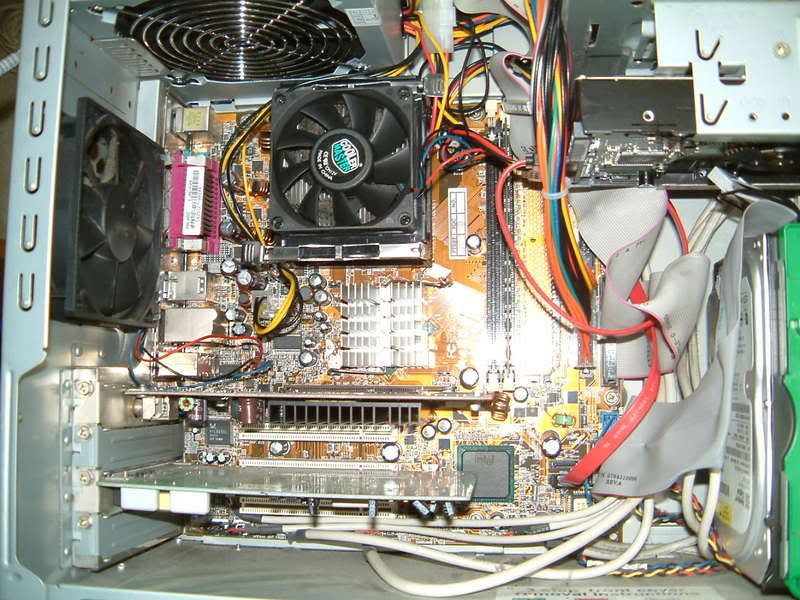
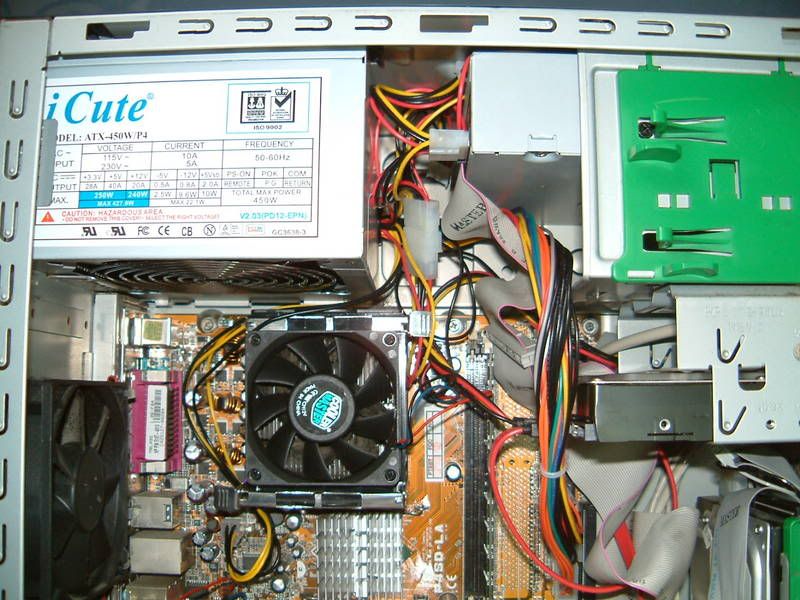
-
According to HP...U have an onboard VGA output and I think I see a graphics card in the AGP slot....so U have 2 places to have monitor output....

can U plug in ur monitor cable(should be blue in colour) to either the AGP slot's graphics card or the onboard VGA output?
and put back ur RAM since mayi says it will not boot without it.
The onboard VGA output is number 9.

-
I don't really get what you mean. Thanks for your suggestion though Xcert.
I think I'll bring my cpu down to causeway point to one of the shops to let them diagnose the problem for me and explore my options from there onwards.
Thanks to those who has offered their help to me! Will be back to update you guys on what the problem is. That's if you people wanna know. :)
-
Originally posted by dahliamorie:
I don't really get what you mean. Thanks for your suggestion though Xcert.
I think I'll bring my cpu down to causeway point to one of the shops to let them diagnose the problem for me and explore my options from there onwards.
Thanks to those who has offered their help to me! Will be back to update you guys on what the problem is. That's if you people wanna know. :)
welcome.
I do.kindly update us.

-
saw your post after i posted mine. there's only one monitor cable and one blue output. what you meant was to plug the blue wire to number 9 right? it has always been plugged to number 9.
-
There also seems to be another graphics card. Can you plug in the monitor cable to that graphics card. It is below the current port you are plugging in the monitor cable to.
-
Originally posted by dahliamorie:
saw your post after i posted mine. there's only one monitor cable and one blue output. what you meant was to plug the blue wire to number 9 right? it has always been plugged to number 9.
see if there is another 15 pin hole socket...likely to be vertically placed.if there is...plug out the blue wire from number 9 and fit it to the socket and see if U get display output.
I need to go off already so I think I will leave U in the good hands of mayi.
Gd luck with your troubleshooting.:)
-
Originally posted by ndmmxiaomayi:
There also seems to be another graphics card. Can you plug in the monitor cable to that graphics card. It is below the current port you are plugging in the monitor cable to.
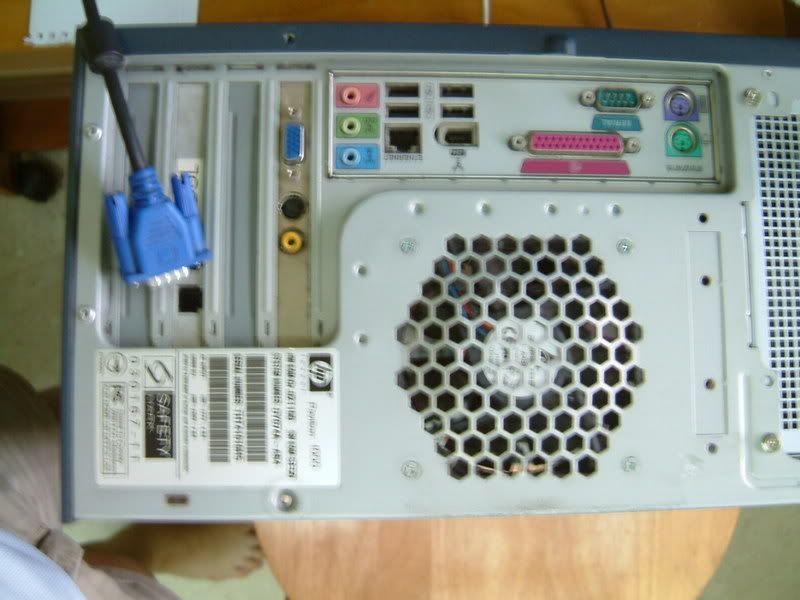
theres no other 15 pin plug. only 1. the other 1 is a 9 pin plug.
-
remove ur PCI modem card and try.