Graphic Card for Laptops?
-
Hi, currently I'm playing WolfTeam on my laptop and it lags when everybody shoots together when near each other. is it my graphic card lousy or the game itself? my graphic card os 252mb mobile intel graphics media accelerator 950. what can i build in to make the game less lag?
-
-- use a lesser stat option.
-- defrag
-- update your graphics card
-
laptop graphic card can just change 1 meh?
-
Yes, your graphic card sucks.
What do you expect from integrated graphics?

-
Originally posted by SexyChin:
Yes, your graphic card sucks.
What do you expect from integrated graphics?
integrated graphics sux -
If you want to play such type of games, I suggest that you get a desktop with a proper graphics card.
-
must see what os too haas.
-
I don't play that game, but as kenn3th suggests, use a graphics setting that is of a lower resolution
you might also want to try the tips in the sticky for speeding your computer
also, you might also want to close down unused programs running in the background.
finally, what is your laptop specs?
-
reduce the resolution and details in game.If the game runs well in SP, then the connection is the cause.
-
if your graphics card has a controller, (go to display property> advanced) go to its options and slide the bar over towards performance and away from quality. edit: just checked... onboard graphics doesnt have this function... lol suck thumb... adjust your ingame options
-
 i m back!
 -
Mine says "Up to 252MB Mobile Intel Graphics Media Accelerator 950".
-
Ur's is an integrated graphics card to Mother board.It's not powerful at all.
U hv to get a dedeictaed card atleast Nvidia 7600 or Ati x1600 and above.But it can't be changes u will hv to get a new laptop with tht built in.
-
Agreed

-
actually u can upgrade your memory card!
i found out a few weeks ago. however it ain easy
http://www.notebookcheck.net/Upgrade-Replace-a-Notebook-Video-Card.3236.0.html
it is nearly impossible to replace video cards of notebooks without MXM, Axiom or "Dell Slot
-
Intel graphics card suck...and thats a fact.
Source: http://forum.notebookreview.com/showpost.php?p=1654743&postcount=1
Only 1% of the notebook sold in the market allows you to upgrade their graphics card
- Proprietary modular format - (mainly Dell Laptops)
- MXM (Mobile PCI EXpress Module) - http://www.mxm-upgrade.com/Table.html -
Hi,
This is kind of off topic but i have to ask, for a desktop graphic card slot, how do I differentiate is mine is a PCI-E or the normal PCI?
-
check motherboard manual
-
Originally posted by fifteen:
what can i build in to make the game less lag?
Get a desktop PC for gamers.
simnatic a PCI-E slot is smaller then a normal PCI.
-
u only have 1 choice - add more system ram. the GPU ram will aso increase this way cos onboard GPI uses system ram. note that you'll bottleneck @ 3.25GB system ram even if you put in 4GB ram.
then tweak your GPU for performance instead of quality. try to reduce the visual effects your OS uses as well. -
Originally posted by playmemory:
Get a desktop PC for gamers.
simnatic a PCI-E slot is smaller then a normal PCI.
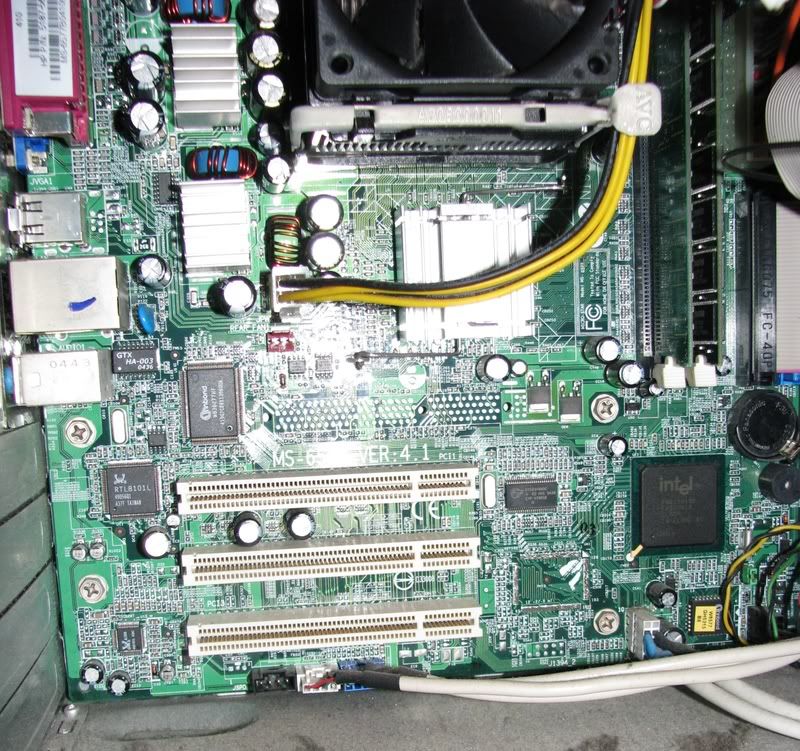
Ok, i'm really sorry but i really don't know how to tell the diff between PCI and PCI-E. So, if possible, can u guys help me identify what type of PCI slot I have with the picture i attach here? Thank you very very much. :)
-
looks like 3 PCI slot to me. How old is your computer :S
anything over 3yrs old shouldnt have a PCIE port unless you are the intel devs. -
Originally posted by abao:
looks like 3 PCI slot to me. How old is your computer :S
anything over 3yrs old shouldnt have a PCIE port unless you are the intel devs.thanks 4 ur reply. my pc is from 2004...