My disk drive disappeared
-
After uninstalling Daemon tools for playing FM 08, my disk drive suddenly disappeared. Now, whenever i insert any disk, nothing comes up. Can any experts help?
-
Disk Drive as in the Cd drive?
Can i have more details like your operating system ect.
-
not the actual disk drive. i mean, when u open up My Computer the disk icon has disappeared
-
ya. Cd drive ?
the cd drive suddenly disapper then when u try to run disc will not load right?
-
Is it in device manager?Seems like the driver of virtual CD didn't like ur physical drive.
-
If the drive is missing it will not be in the device manager.
Ts must update and locate the hardware there.
After that the case should be solved
-
how do i do that?
-
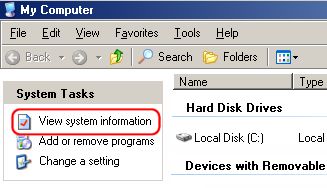
Open up my computer. Then click on view system information
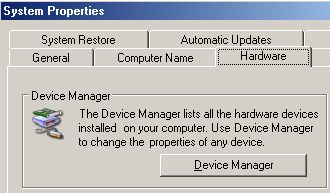
Go to the hardware tab and click on device manager
Click on Actions and scan for hardware changes.
-
If the above steps can't work, do this.
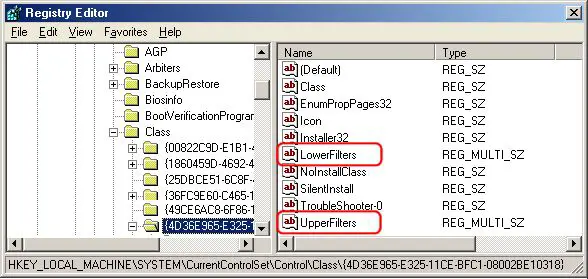
- Click Start, then Run, then enter REGEDIT to open the Registry Editor
- Navigate to the HKEY_LOCAL_MACHINE/SYSTEM/CurrentControlSet/Control/Class entry
- Under the Class entry, double click on {4D36E965-E325-11CE-BFC1-08002BE10318}
- In the right-hand pane, click ONCE to select the UpperFilters entry
- Make sure the UpperFilters entry is highlighted, press Delete, then Yes.
- In the right-hand pane, click ONCE to select the LowerFilters entry
- Make sure the LowerFilters entry is highlighted, press Delete, then Yes.
- Close the Registry Editor by clicking File, Exit.
-
thanks for the help but it still doesnt work

-
Can u reinstall the windows?
-
nah..i dont want to. i dont use the disk drive that much anyway. i asked for help because im buying an ipod. but i figured that u dont need to use the cd. can download all the stuff on the internet right?
-
Originally posted by yellow_monkey:
nah..i dont want to. i dont use the disk drive that much anyway. i asked for help because im buying an ipod. but i figured that u dont need to use the cd. can download all the stuff on the internet right?
Yes sure.Drivers and suites can be found online through the apple website
-
Daemon tools messed my cd drive in the past too by removing the recording tab.