Problems in my standby screen
-
After playing a full screen game, I came back and notice my standby screen being like that. Restarted my comp several times but no avail. Any solutions?
[img]http://i160.photobucket.com/albums/t174/vballguyy/problem-5.jpg[/img]
-
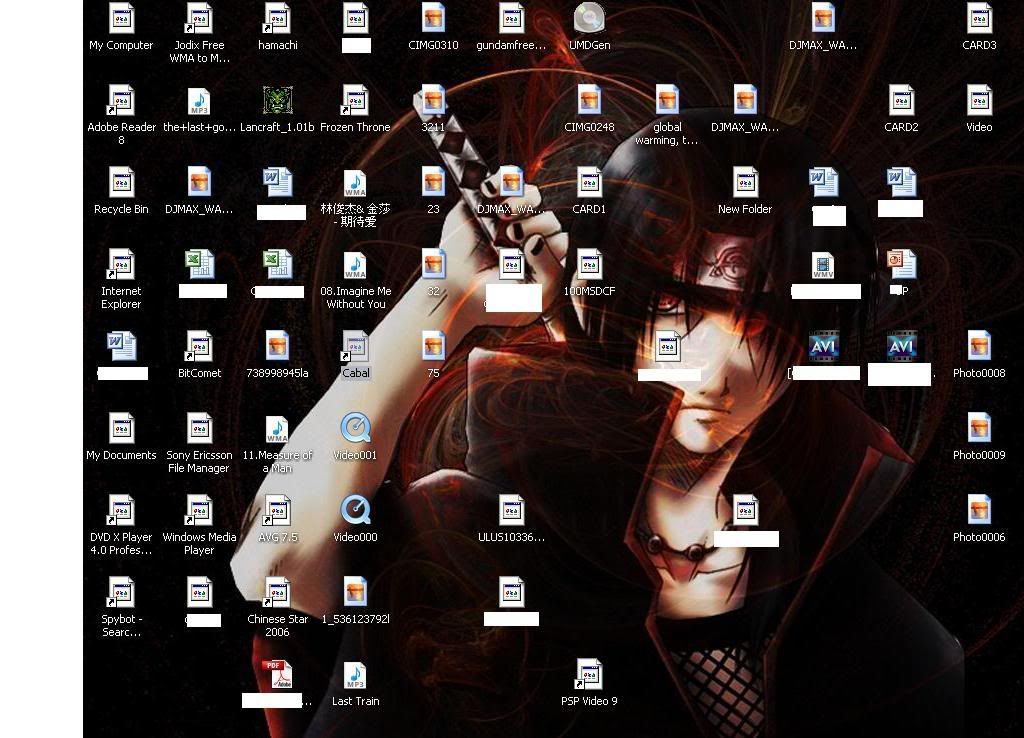
-
you mean most of your icons became like that?
- To fix your problem, download and install TweakUI for Windows XP
http://www.microsoft.com/windowsxp/downloads/powertoys/xppowertoys.mspx
- After installing, go to Start > Programs > PowerToys for Windows XP >
TweakUI. - Click the "Repair" link, in the right pane of TweakUI, click on the pull-down and choose "Rebuild Icons".
- Click "Repair Now", then "OK" to close the dialog box.
If it doesnt work go to:
C:\Documents and Settings\user name\Local Settings\Application Data\iconcache.db
to see if the icons are there
If a prompt is given when you click on C drive to "show hidden files", click to show it. -
There're a lot of files there in the website you have me. May I know which one I should download?
-
I got it. Thanks! :)
-
Np^^