Unknown advertisement always popout
-
As topic above.
Sometimes it pop out and i used AVG Anti Spyware it still cant be removed! Then i have to delete manually in the Analaysis. Sometimes it have over 10internet explorer hidden on.
Please can anyone help me? I will appreciate ya! Thanks. I have a hijackthis logfile.
-
Interesting stuffs there.
Disable Symantec Antivirus.
If you already have Combofix, please delete this copy and download it again as it's being updated regularly.
Please visit this webpage for download links, and instructions for running the tool:
http://www.bleepingcomputer.com/combofix/how-to-use-combofixPlease ensure you read this guide carefully and install the Recovery Console first.
The Windows Recovery Console will allow you to boot up into a special recovery (repair) mode. This allows us to more easily help you should your computer have a problem after an attempted removal of malware. It is a simple procedure that will only take a few moments of your time.
Once Recovery Console is installed, you should see a blue screen prompt like the one below: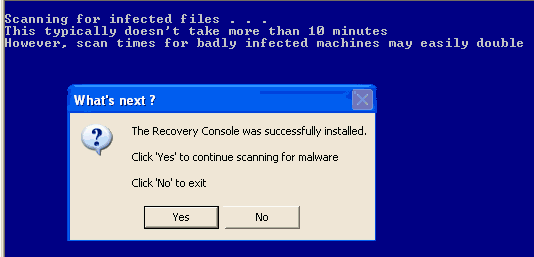
Click Yes to allow Combofix to continue scanning for malware.
When done, a log will be produced. Please post that log and a new HijackThis log in your next reply.
Do not mouse click on Combofix while it is running. That may cause it to stall.Upload to Mediafire as usual. Don't want sgF to chop off some letters or symbols.
-
I was at this screen http://img.bleepingcomputer.com/combofix/en/autoscan.jpg.
Then suddenly it went off and nothing happen? how come?
-
Delete your current copy of Combofix.
Re-download a fresh copy and rename it whatjerom.exe
Then try running this renamed copy.
