Spyware keep reappearing after removal
-
Hi,everyone,i as per topic i need help to remove the spyware that keep reappearing after removal,below is my logfile from hijackthis,thanks in advance.
Logfile of Trend Micro HijackThis v2.0.2
Scan saved at 00:02:33, on 7/5/2008
Platform: Windows XP SP1 (WinNT 5.01.2600)
MSIE: Internet Explorer v6.00 SP1 (6.00.2800.1106)
Boot mode: Normal
Running processes:
C:\WINDOWS\System32\smss.exe
C:\WINDOWS\system32\winlogon.exe
C:\WINDOWS\system32\services.exe
C:\WINDOWS\system32\lsass.exe
C:\WINDOWS\system32\svchost.exe
C:\WINDOWS\System32\svchost.exe
C:\WINDOWS\system32\spoolsv.exe
C:\Program Files\Grisoft\AVG Anti-Spyware 7.5\guard.exe
C:\PROGRA~1\Grisoft\AVG7\avgamsvr.exe
C:\PROGRA~1\Grisoft\AVG7\avgupsvc.exe
C:\PROGRA~1\Grisoft\AVG7\avgemc.exe
C:\WINDOWS\System32\CTsvcCDA.EXE
C:\WINDOWS\System32\gearsec.exe
C:\WINDOWS\system32\svchost.exe
C:\WINDOWS\System32 vsvc32.exe
C:\WINDOWS\System32\svchost.exe
C:\Program Files\Java\j2re1.4.2_03\bin\jusched.exe
C:\windows\system\hpsysdrv.exe
C:\HP\KBD\KBD.EXE
C:\WINDOWS\AGRSMMSG.exe
C:\PROGRA~1\Grisoft\AVG7\avgcc.exe
C:\Program Files\BitComet\BitComet.exe
C:\WINDOWS\System32 undll32.exe
C:\WINDOWS\System32 undll32.exe
C:\WINDOWS\system32 otepad.exe
C:\WINDOWS\System32\SNDVOL32.EXE
C:\Program Files\BitComet\tools\CometBrowser.exe
C:\WINDOWS\explorer.exe
C:\Documents and Settings\Owner\Desktop\mplayerc.exe
C:\Program Files\Mozilla Firefox\firefox.exe
C:\HiJackthis\HiJackThis.exe
R1 - HKCU\Software\Microsoft\Internet Explorer\Main,Default_Page_URL = http://ie.redirect.hp.com/svs/rdr?TYPE=3&tp=iehome&locale=EN_SG&c=Q304&bd=pavilion&pf=desktop
R0 - HKCU\Software\Microsoft\Internet Explorer\Main,Start Page = http://www.gamefaqs.com/
R1 - HKCU\Software\Microsoft\Windows\CurrentVersion\Internet Settings,ProxyOverride = localhost
O2 - BHO: HP Print Enhancer - {0347C33E-8762-4905-BF09-768834316C61} - C:\Program Files\HP\Smart Web Printing\hpswp_printenhancer.dll
O2 - BHO: HP Print Clips - {053F9267-DC04-4294-A72C-58F732D338C0} - C:\Program Files\HP\Smart Web Printing\hpswp_framework.dll
O2 - BHO: (no name) - {0E64E841-2463-47C9-8797-DAF2810BBF61} - C:\WINDOWS\system32\fccCUmmm.dll
O2 - BHO: BitComet ClickCapture - {39F7E362-828A-4B5A-BCAF-5B79BFDFEA60} - C:\Program Files\BitComet\tools\BitCometBHO_1.2.1.2.dll
O2 - BHO: winhost_app.winhost_appdll - {5E06398E-3017-467B-A399-18425A20F655} - C:\WINDOWS\winhost_app.dll
O2 - BHO: (no name) - {B3E6CFB9-2C82-4FF7-85CB-11E680A2EE80} - C:\WINDOWS\System32\hgGvUmjH.dll (file missing)
O2 - BHO: WinAVI FLVSense - {E8DF67A1-B618-4F3F-9E7C-CBE175ADEF5B} - C:\Program Files\WinAVI FLV Converter\FLVTune.dll
O4 - HKLM\..\Run: [PHIME2002ASync] "C:\WINDOWS\System32\IME\TINTLGNT\TINTSETP.EXE" /SYNC
O4 - HKLM\..\Run: [PHIME2002A] "C:\WINDOWS\System32\IME\TINTLGNT\TINTSETP.EXE" /IMEName
O4 - HKLM\..\Run: [SunJavaUpdateSched] "C:\Program Files\Java\j2re1.4.2_03\bin\jusched.exe"
O4 - HKLM\..\Run: [hpsysdrv] c:\windows\system\hpsysdrv.exe
O4 - HKLM\..\Run: [KBD] C:\HP\KBD\KBD.EXE
O4 - HKLM\..\Run: [Recguard] C:\WINDOWS\SMINST\RECGUARD.EXE
O4 - HKLM\..\Run: [PS2] C:\WINDOWS\system32\ps2.exe
O4 - HKLM\..\Run: [AGRSMMSG] AGRSMMSG.exe
O4 - HKLM\..\Run: [AVG7_CC] C:\PROGRA~1\Grisoft\AVG7\avgcc.exe /STARTUP
O4 - HKLM\..\Run: [NvCplDaemon] RUNDLL32.EXE C:\WINDOWS\System32\NvCpl.dll,NvStartup
O4 - HKLM\..\Run: [KernelFaultCheck] %systemroot%\system32\dumprep 0 -k
O4 - HKLM\..\Run: [1ccfb9fe] rundll32.exe "C:\WINDOWS\System32\appdbuqd.dll",b
O4 - HKLM\..\RunOnce: [Spybot - Search & Destroy] "C:\Program Files\Spybot - Search & Destroy\SpybotSD.exe" /autocheck
O4 - HKUS\S-1-5-19\..\Run: [AVG7_Run] C:\PROGRA~1\Grisoft\AVG7\avgw.exe /RUNONCE (User 'LOCAL SERVICE')
O4 - HKUS\S-1-5-20\..\Run: [AVG7_Run] C:\PROGRA~1\Grisoft\AVG7\avgw.exe /RUNONCE (User 'NETWORK SERVICE')
O8 - Extra context menu item: &Download All with FlashGet - C:\Program Files\FlashGet\jc_all.htm
O8 - Extra context menu item: &Download with FlashGet - C:\Program Files\FlashGet\jc_link.htm
O9 - Extra button: BitComet - {D18A0B52-D63C-4ed0-AFC6-C1E3DC1AF43A} - res://C:\Program Files\BitComet\tools\BitCometBHO_1.2.1.2.dll/206 (file missing)
O20 - Winlogon Notify: fccCUmmm - C:\WINDOWS\SYSTEM32\fccCUmmm.dll
O23 - Service: AVG Anti-Spyware Guard - GRISOFT s.r.o. - C:\Program Files\Grisoft\AVG Anti-Spyware 7.5\guard.exe
O23 - Service: AVG7 Alert Manager Server (Avg7Alrt) - GRISOFT, s.r.o. - C:\PROGRA~1\Grisoft\AVG7\avgamsvr.exe
O23 - Service: AVG7 Update Service (Avg7UpdSvc) - GRISOFT, s.r.o. - C:\PROGRA~1\Grisoft\AVG7\avgupsvc.exe
O23 - Service: AVG E-mail Scanner (AVGEMS) - GRISOFT, s.r.o. - C:\PROGRA~1\Grisoft\AVG7\avgemc.exe
O23 - Service: Creative Service for CDROM Access - Creative Technology Ltd - C:\WINDOWS\System32\CTsvcCDA.EXE
O23 - Service: Gear Security Service (GEARSecurity) - GEAR Software - C:\WINDOWS\System32\gearsec.exe
O23 - Service: iPod Service (iPodService) - Apple Computer, Inc. - C:\Program Files\iPod\bin\iPodService.exe
O23 - Service: NetCom3 Service (Netcom3) - Unknown owner - C:\Program Files\Netcom3 Cleaner\PSCMonitor.exe (file missing)
O23 - Service: NVIDIA Display Driver Service (NVSvc) - NVIDIA Corporation - C:\WINDOWS\System32 vsvc32.exe
--
End of file - 5124 bytes -
Please upload it to Mediafire. The backslashes and some letters are being chopped off.
-
I have uploaded the file here http://www.mediafire.com/?1b9y9w18xiu
[URL]http://www.mediafire.com/?1b9y9w18xiu[/URL]
-
If you already have Combofix, please delete this copy and download it again as it's being updated regularly.
Please visit this webpage for download links, and instructions for running the tool:
http://www.bleepingcomputer.com/combofix/how-to-use-combofix
Please ensure you read this guide carefully and install the Recovery Console first.
The Windows Recovery Console will allow you to boot up into a special recovery (repair) mode. This allows us to more easily help you should your computer have a problem after an attempted removal of malware. It is a simple procedure that will only take a few moments of your time.
Once Recovery Console is installed, you should see a blue screen prompt like the one below: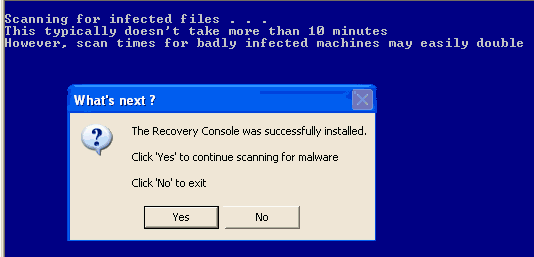
Click Yes to allow Combofix to continue scanning for malware.
When done, a log will be produced. Please post that log and a new HijackThis log in your next reply.
Do not mouse click on Combofix while it is running. That may cause it to stall.Please upload all the logs to Mediafire. Otherwise, some letters and backslashes will be chopped off.
-
Hijack this
http://www.mediafire.com/?znen04s9nks
ComboFix
http://www.mediafire.com/?dmublvnnm0w
Thanks
-
Did you install this program - RapidShare_Unlimited_File_Downloader ?
If so, please uninstall it.
-
After you've uninstalled it, please do the following:
Download this file - http://www.mediafire.com/?cbdluygdud3
Save it as CFScript.txt
Referring to the picture below, drag CFScript into Combofix.

Combofix will start running. When done, a log will be produced. Please post this log in your next reply.
Do not mouse click on Combofix while it is running. That may cause it to stall.Please upload all the logs to Mediafire.
-
http://www.mediafire.com/?4xr44ngnimj
http://www.mediafire.com/?sxyixjm3d4w
-
Download ATF Cleaner and save it to your desktop.
Double click on ATF-Cleaner.exe to run it.
- Click on Main at the top.
- Tick all the boxes except the Prefetch and Cookies box.
- Click on Empty Selected button.
If you use Firefox
- Click on Firefox at the top.
- Tick all the boxes except Firefox Cookies and Firefox Saved Passwords.
- Click on Empty Selected button.
If you use Opera
- Click on Opera at the top.
- Tick all the boxes except Opera Cookies and Opera Saved Passwords.
- Click on Empty Selected button.
Close ATF Cleaner when you are done.
- Please download Malwarebytes' Anti-Malware and save it to a convenient location.
- Double click on mbam-setup.exe to install it.
- Before clicking the Finish button, make sure that these 2 boxes are checked (ticked):
-
Update Malwarebytes' Anti-Malware
Launch Malwarebytes' Anti-Malware - Malwarebytes' Anti-Malware will now check for updates. If your firewall prompts, please allow it. If you can't update it, select the Update tab. Under Update Mirror, select one of the websites and click on Check for Updates.
- Select the Scanner tab. Click on Perform full scan, then click on Scan.
- Leave the default options as it is and click on Start Scan.
- When done, you will be prompted. Click OK, then click on Show Results.
- Checked (ticked) all items and click on Remove Selected.
- After it has removed the items, Notepad will open. Please post this log in your next reply. You can also find the log in the Logs tab. The bottom most log is the latest.