Virus sos?
-
Oh shoots, i tink i mistakedly downloaded virus thinking that it is a codec for videos.
Is there any free software that I can download to get rid of the virus??
Thanks alot!
The virus keeps prompting me to somewebsite to download their program to protect privacy. Damn boh liao..
-
the only way to get rid of that virus is to get a anti virus software
-
some malwares can't even be detected
-

This is my desktop right now. I tink this virus is pretty common, anyone noes how to get rid of it?
-
So the only thing i can do now is
1) Reformatt comp
2) buy anti virus software?
-
tio before, is u downlaod a codec
i will recommend u to use combofix to fix
but scan a log for mayi to see first
-
As per usual... read stickies...
On another note, this one is quite old... LOL
-
ya lor ya lor this virus is quite old liao.
I read stickies le, and i decided to download antivirus works and spybot-search and destroy.
Hope can work.
-
She's referring to the sticky to upload a HijackThis log to Mediafire and posting the link to the log here.
And I see Lancraft there. DotA?

-
DotA is for my DotA-siao brother XD.
http://www.mediafire.com/?bdtmdyeeljy
Is this the log file? Anyways i tink my comp is fine le! Except for the bottom left hand corner where the time is says "VIRUS ALERT!"
So i guess 'Search and Destroy' kinda fixed the problem le. Right?

-
Basket. Means it's a new variant.
-
wah new pattern ar??
My windows is working fine, except sumtimes it still prompt me to dl the file. Other den that it's ok.
-
LOL... you got an assortment of old and new viruses.
Virus Alert near the clock - New
That bio hazard background - Old
In between, add Vundo.
Disable AntiVir as it will interfere with Combofix.
This topic contains the instructions for disabling AntiVir Antivirus (find the one with umbrella icon) - http://www.bleepingcomputer.com/forums/topic114351.html
If you already have Combofix, please delete this copy and download it again as it's being updated regularly.
Please visit this webpage for download links, and instructions for running the tool:
http://www.bleepingcomputer.com/combofix/how-to-use-combofix
Please ensure you read this guide carefully and install the Recovery Console first.
The Windows Recovery Console will allow you to boot up into a special recovery (repair) mode. This allows us to more easily help you should your computer have a problem after an attempted removal of malware. It is a simple procedure that will only take a few moments of your time.
Once Recovery Console is installed, you should see a blue screen prompt like the one below:
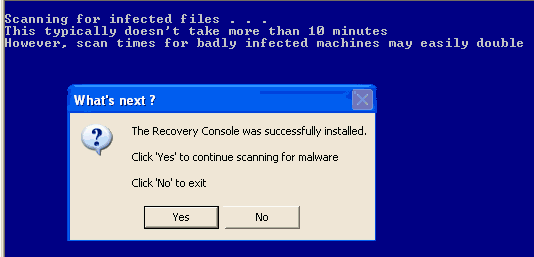
Click Yes to allow Combofix to continue scanning for malware.
When done, a log will be produced. Please post that log and a new HijackThis log in your next reply.
Do not mouse click on Combofix while it is running. That may cause it to stall.
Upload all the logs to Mediafire as usual so sgF don't eat up the letters.
-
ok me go on desktop now.
But no rush la, i can settle tml if u need to sleep =D
-
Most likely I will check back tomorrow. You can just post if you want.

-
can can tml den check back ba, i go take my time look around the web.
I beri IT idiot one.

-
Fwah i do the Combofix liao. Reali power lehs!
No more VIRUS ALERT beside my computer clock liao!
And i can see more items on my desktop now~ I tink the virus block some programs last time.
http://www.mediafire.com/?f3vbdtmjttz
This is the new media log file. Should be ok le rites?? XD
Sho happi~
-
Please upload the Combofix log to Mediafire. There may be some leftovers.
Log can be found at C:\Combofix.txt
-
Ok i upload later k.
Coz my brother is back from camp and he's hogging the comp. =_=
Thanks alot yea!~
-
Here is the combofix file.

http://www.mediafire.com/?xt9cryy3tqd
My window sometimes has alot of pop up screen. Unstoppable one.

-
The wrong version of Recovery Console has been installed. We need to get it removed and re-install the correct version. Please ensure that you read through all instructions carefully. If any of the steps are unclear, please let me know.
Show hidden files and folders
- Open My Computer.
- Go to Tools > Folder Options.
- Select the View tab.
- Scroll down to Hidden files and folders.
- Select Show hidden files and folders.
- Uncheck (untick) Hide extensions of known file types.
- Uncheck (untick) Hide protected operating system files (Recommended).
- Click Yes when prompted.
- Click OK.
Step 1
Delete this file, it's on your desktop.
C:\Documents and Settings\Administrator\Desktop\WinXP_EN_HOM_BF.EXE
Step 2
Delete this folder - C:\cmdcons
Step 3
Delete this file file - C:\Boot.ini
Step 4
Right click on this file - C:\Boot.bak and select Rename.
Copy and paste in Boot.ini and press Enter.
Let me know when you have done all 4 steps. Don't restart your computer yet.
- Open My Computer.
-
I cant find c:\boot.ini in my C drive though when i type c:\boot.ini i can find it.
As in, i don't see boot.ini file in c:\
-
Show hidden files already?
Boot.ini by default is hidden.
-
ok sollie missed 1 step.
Ok already :)
-
Is Boot.bak renamed to boot.ini ?