How to remove virus remover 2008?
-
Just today, i start having annoying pop-ups that keep asking me to install virus remover 2008 because there's virus. My toolbar changed, and i can't access c drive nor task manager.
May i know how to remove this?
Thanks.
-
Run anti spyware and try..
-
Post removed. Spyhunter is a bad product.
-
One software I know of would works, I have tried it and is ok. Malwarebytes Anti-Malware. I think you need to pay.
-
http://forums.spybot.info/showpost.php?p=221792&postcount=20
-
Originally posted by ndmmxiaomayi:
http://forums.spybot.info/showpost.php?p=221792&postcount=20
Spybot was not working when I was hit by that virus. I found Malware did an excellent job in getting rid of it.
-
Originally posted by April Shower:
Spybot was not working when I was hit by that virus. I found Malware did an excellent job in getting rid of it.
Thanks for everyone's replies. Yea, i tried spybot, but it didn't remove it. I will give this a go. Thanks. -
If you already have Combofix, please delete this copy and download it again as it's being updated regularly.
Please visit this webpage for download links, and instructions for running the tool:http://www.bleepingcomputer.com/combofix/how-to-use-combofix
Please ensure you read this guide carefully and install the Recovery Console first.
The Windows Recovery Console will allow you to boot up into a special recovery (repair) mode. This allows us to more easily help you should your computer have a problem after an attempted removal of malware. It is a simple procedure that will only take a few moments of your time.
Once Recovery Console is installed, you should see a blue screen prompt like the one below:
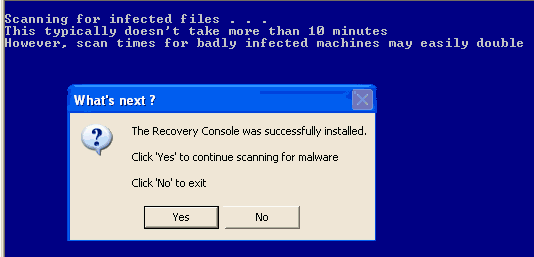
Click Yes to allow Combofix to continue scanning for malware.
When done, a log will be produced. Please post that log and a new HijackThis log in your next reply.
Do not mouse click on Combofix while it is running. That may cause it to stall.
In your next reply, please post:- Combofix log (C:\Combofix.txt)
- A new HijackThis log
Please upload the logs so that sgF doesn't eat away some of the letters/words in the logs.
-
Originally posted by ndmmxiaomayi:
If you already have Combofix, please delete this copy and download it again as it's being updated regularly.
Please visit this webpage for download links, and instructions for running the tool:http://www.bleepingcomputer.com/combofix/how-to-use-combofix
Please ensure you read this guide carefully and install the Recovery Console first.
The Windows Recovery Console will allow you to boot up into a special recovery (repair) mode. This allows us to more easily help you should your computer have a problem after an attempted removal of malware. It is a simple procedure that will only take a few moments of your time.
Once Recovery Console is installed, you should see a blue screen prompt like the one below:
Click Yes to allow Combofix to continue scanning for malware.
When done, a log will be produced. Please post that log and a new HijackThis log in your next reply.
Do not mouse click on Combofix while it is running. That may cause it to stall.
In your next reply, please post:- Combofix log (C:\Combofix.txt)
- A new HijackThis log
Please upload the logs so that sgF doesn't eat away some of the letters/words in the logs.
Thanks a lot. :) The virus/spyware is already gone.
Thanks.
-
Originally posted by OasisBlue:
Thanks a lot. :) The virus/spyware is already gone.
Thanks.
Did the software, . Malwarebytes Anti-Malware I recommended help? Just want to know so that I can recommend it to others in trouble.
-
Originally posted by April Shower:
Did the software, . Malwarebytes Anti-Malware I recommended help? Just want to know so that I can recommend it to others in trouble.
Yes. ndmmxiaomayi mentioned that too. It's good. :)
-
Originally posted by OasisBlue:
Yes. ndmmxiaomayi mentioned that too. It's good. :)
I didn't mention it's good. It's only a quick fix solution.
-
Originally posted by ndmmxiaomayi:
I didn't mention it's good. It's only a quick fix solution.
As in, you mentioned that program. I tried it, and it's good. "mention that too. It's good." and "mention that too it's good" are different.Thanks anyway.
