Can someone teach me how to use MS word?
-
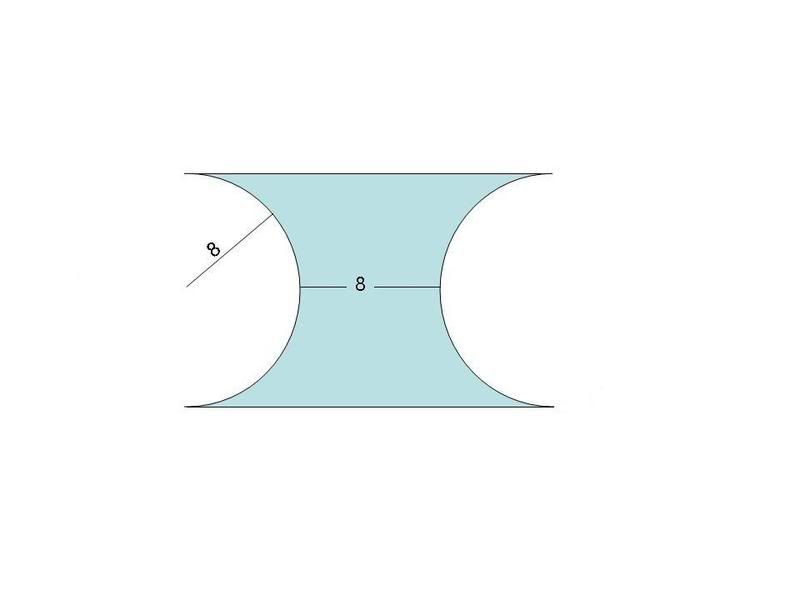
How to draw a figure like this? I want to have part of the figure shaded as well.

how to select which part you want it be to shaded? I cant use freeform well.
-
paiseh dunno. usually if i want to have a image in word i will first draw it in powerpoint thn save it as a jpeg image. thn in ms word i insert it as a pic. hope this helps.
-
I won't really recommend using Word if you need to draw shapes of precision and accuracy. But if it's just a chin-chai task, simply draw a filled rectangle and a circle with borders on each side of the rectangle with its entire width as the diameter of the circle. Then use a borderless, transparent rectangle to cover the borders outside the original rectangle of each circle.
-
I dunno how to make the breadth of a rectangle borderless while keeping the length bordered.
Also dunno how to shade the correct parts.
-
oops true hor. ok if u r idiot like me thn in powerpoint draw a rectangle n shade it in the color u want. draw the two circles n shade them white. then draw the lines n label as u require. save the file as a jpeg thn open it in paint n erase away the unwanted lines thn save it. leh chey but this is the simplest way i know how with basic office
-
Make sure your rectangle is 24x16.
-
shouldn't this be in IT and Support?
-
-
not a bad effort if i do say so myslf. haha....
-
Bump. I need to know how to do this without using ms powerpoint. Skeujin, thanks for your effort.
-
Originally posted by weewee:
I dunno how to make the breadth of a rectangle borderless while keeping the length bordered.
Also dunno how to shade the correct parts.
Use a fill for the circles which is identical to the background colour and make sure they appear above the original rectangle.
-
i done it using overlapping shape cheating .. not sure ok anot :lol:
- First create a green rectangle
- Create two white circle with black border
- Create a rectangle that is large enough to cover half of the circle and set it to no border x2 (right click the rectangle format shape and select color = no line)
- than select all the shape and group together so that when is drag none of the shape is left out

-
Then how to draw a figure like this? how to shade the upper segment?

-
Mod, if possible, help to transfer this thread to IT and Support. Thanks.
-
it required a few more step ... k la abit ugly :lol:
- first draw a circle
- than AutoShapes > basic shape > iso triangle ... than flip the triangle vertically
- now for the harder part semi circle.....
- insert picture > autoshapes > more autoshapes > than scroll to find the semi circle
- click on the semi circle u created ... select shadow styles = no shadow
- right click semi circle > format autoshapes ... select no border
- than on the same screen > color > fill effects > Patterns > change color to black and white .... than select the vertical lines shape > ok
- arrange yr semi circle behind the triangle ... and rotate in postion .. after than group everything together

-
use paint

-
bump> i am sure there's a good way of shading whereever you want.
-
i know liao...go to freeform, click one point to another to choose the places you want to shade. Thread closed.
-
best is use powerpoint lol.. den save de image copy paste lor..